Automating lead ingestion for Applied Epic via n8n
It's not a secret that there is a lot of double entry in the broker world. Double entry and re-typing data are gigantic wastes of time. I wanted to remove some of that for a client by bridging their website with Applied Epic directly using modern tooling.
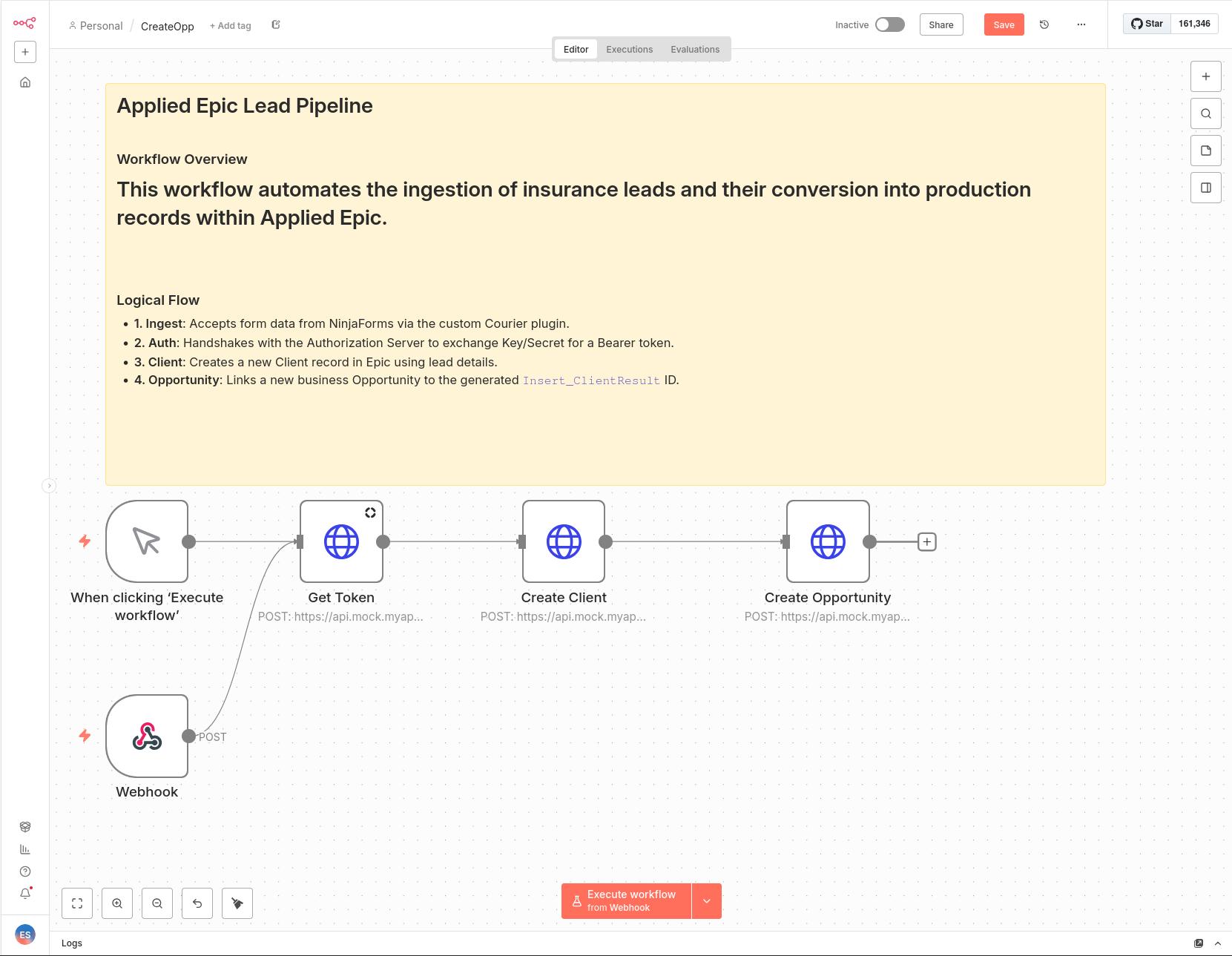
The Result
I built a developer-focused proof-of-concept (PoC) to capture insurance leads via Ninja Forms and ship them to Applied Epic via their recently released API.
I decided to implement this using n8n for two reasons.
- It's all the rage and I wanted to know what it was.
- If it lives up to the hype, we can build the form ingestion once, and then the business can leverage this for all sorts of workflows without engaging a developer.
I setup it up in docker via docker-compose.
The whole flow is simple: Ninja Forms captures the data; our custom plugin (the "Courier") posts it to a webhook in n8n; and n8n orchestrates the auth handshake with Applied, then creates a new Client, and posts the Opportunity.
The Real Challenges
The biggest hurdle for me was WordPress and Ninja Forms. I wasn’t familiar with adding custom configuration values, and we also had to make sure sensitive credentials weren’t visible to anyone looking over the shoulder. I struggled to find any NinjaForms examples of "password" fields.
We solved this by using some custom styling in the plugin. The plugin lets us configure the webhook URL, username, and password in the form settings, and it applies a CSS rule to mask the password input:
// Hide password field in Ninja Forms admin
add_action('admin_head', function() {
    echo '<style>
        input[id*="n8n_password"] {
            -webkit-text-security: disc !important;
            text-security: disc !important;
            font-family: text-security-disc !important; /* fallback for some browsers */
        }
    </style>';
});
The rest of the plugin is standard plumbing. We capture the form data and toss it over the fence to the n8n webhook.
class NF_Action_n8n_Courier extends NF_Abstracts_Action {
		protected $_name = 'n8n_courier';
		protected $_timing = 'normal';
		protected $_priority = 10;

		public function __construct() {
			parent::__construct();
			$this->_nicename = __('Send to n8n', 'ninja-forms');

			// Add a setting field in the UI for the Webhook URL
			$this->_settings['n8n_url'] = array(
				'name' => 'n8n_url',
				'type' => 'textbox',
				'group' => 'primary',
				'label' => __('n8n Webhook URL', 'ninja-forms'),
				'placeholder' => __('http://n8n:5678/webhook/...', 'ninja-forms'),
				'value' => '',
				'width' => 'full',
			);


			// Add a setting field in the UI for the Webhook URL
			$this->_settings['n8n_username'] = array(
				'name' => 'n8n_username',
				'type' => 'textbox',
				'group' => 'primary',
				'label' => __('Basic Auth Username:', 'ninja-forms'),
				'placeholder' => __('username...', 'ninja-forms'),
				'value' => '',
				'width' => 'full',
			);


			// Add a setting field in the UI for the Webhook URL
			$this->_settings['n8n_password'] = array(
				'name' => 'n8n_password',
				'type' => 'textbox',
				'group' => 'primary',
				'label' => __('Basic Auth password:', 'ninja-forms'),
				'placeholder' => __('password...', 'ninja-forms'),
				'value' => '',
				'width' => 'full',
			);
		}

		public function process($action_settings, $form_id, $data) {
			$url  = $action_settings['n8n_url'];
			$user = $action_settings['n8n_username'];
			$pass = $action_settings['n8n_password'];

			// Map fields
			$fields = array();
			foreach ($data['fields'] as $field) {
				$fields[$field['key']] = $field['value'];
			}

			// Generate Auth Header
			$auth = base64_encode("$user:$pass");

			// --- LOGGING ---
			error_log("--- NINJA FORMS n8n COURIER START ---");
			error_log("Target URL: " . $url);
			error_log("Mapped Fields: " . print_r($fields, true));
			error_log("Auth Header created (Basic encoded)");

			// Fire the Request
			$response = wp_remote_post($url, [
				'headers' => [
					'Content-Type'  => 'application/json',
					'Authorization' => 'Basic ' . $auth,
				],
				'body'    => json_encode($fields),
				'blocking' => true, // Set to true temporarily to log the actual response
			]);

			// Log the Response from n8n
			if (is_wp_error($response)) {
				error_log("n8n Response Error: " . $response->get_error_message());
			} else {
				error_log("n8n Response Body: " . wp_remote_retrieve_body($response));
			}
			error_log("--- NINJA FORMS n8n COURIER END ---");

			return $data;
		}
	}
This approach keeps the integration clean and decoupled from the front-end logic, while giving full control over the data flow from WordPress → n8n → Applied Epic.
It also means we don't need to touch the Ninja Forms tooling that is popular with many WordPresss sites.
Clean Architecture
Because we never complected the logic inside the WordPress forms, and by placing n8n in between, the integration is fully pluggable. If we want to replace Applied Epic with another BMS tomorrow, we just update the n8n workflow—the frontend doesn’t need to change. Who knew separation of concerns was so powerful.
Key Takeaways
- n8n is quick to get going: It’s really fast to set up and start automating things. I prefer a REPL myself, but for non-developer audiences, it’s a great way to get basic workflows and integrations running without writing a lot of code. I'm not surprised everyone is talking about it.
- Potential for an unofficial Applied Epic plugin: I’m interested in building a plugin that handles auth and lets you post/query Applied Epic right out of the box. That would make creating and maintaining workflows much faster.
The Repo
The entire codebase is available on Github.